The fair question
Have you ever used a tool or app and thought, “I wish it could do…”, then ended up exploring other options? Not long ago, building your own was something only people with years of development experience could do. AI has changed that, and very quickly.
Have you watched people on YouTube build an app in a few hours? Me too. Ever thought, “How do I even start?” Me too.
Knowing where to start, when there’s a new “this changes everything” every hour, can feel hugely overwhelming. It shouldn’t. This log is about getting going on the app you or your business needs, and knowing where to look for honest information and guidance.
We’ve been here before
Tools for building websites, and more recently apps, were around long before AI. WordPress, Joomla, Squarespace and Wix gave us more visual ways to build websites (often called no-code). More recently, tools like Airtable have let us build app-like business tools too. Even with all of that available, sometimes it was easier to ask someone to build the whole thing, part of it, or just help you make sense of the documentation. I’ve been there!
Just because something exists doesn’t mean it will be used. As a teacher, I wanted my student reports to be detailed and personal. I didn’t want to spend hours creating files and fighting layout issues in a Word document, so I used mail merge, and could focus on writing useful feedback for students instead. I was keen to show colleagues they could focus on the content rather than the admin too. Many chose to keep their manual methods.
AI has let us be more creative and explore more, faster. But the reasons people build something themselves, or ask for help, haven’t really changed.
How I got here
AI is impressive, and getting more so. There has never been a better time to try to create something you could only have dreamt of five years ago. If you’re just getting started, it can feel like you’ve got a lot to catch up on. You don’t, and it’s not as complicated as it might first appear.
Think about the first time you used Word or a spreadsheet. There was a learning curve: you learnt the tool’s way of doing things, and by now it’s probably second nature. The good news with AI is that you no longer have to learn the tool’s way of doing things. You describe yours.
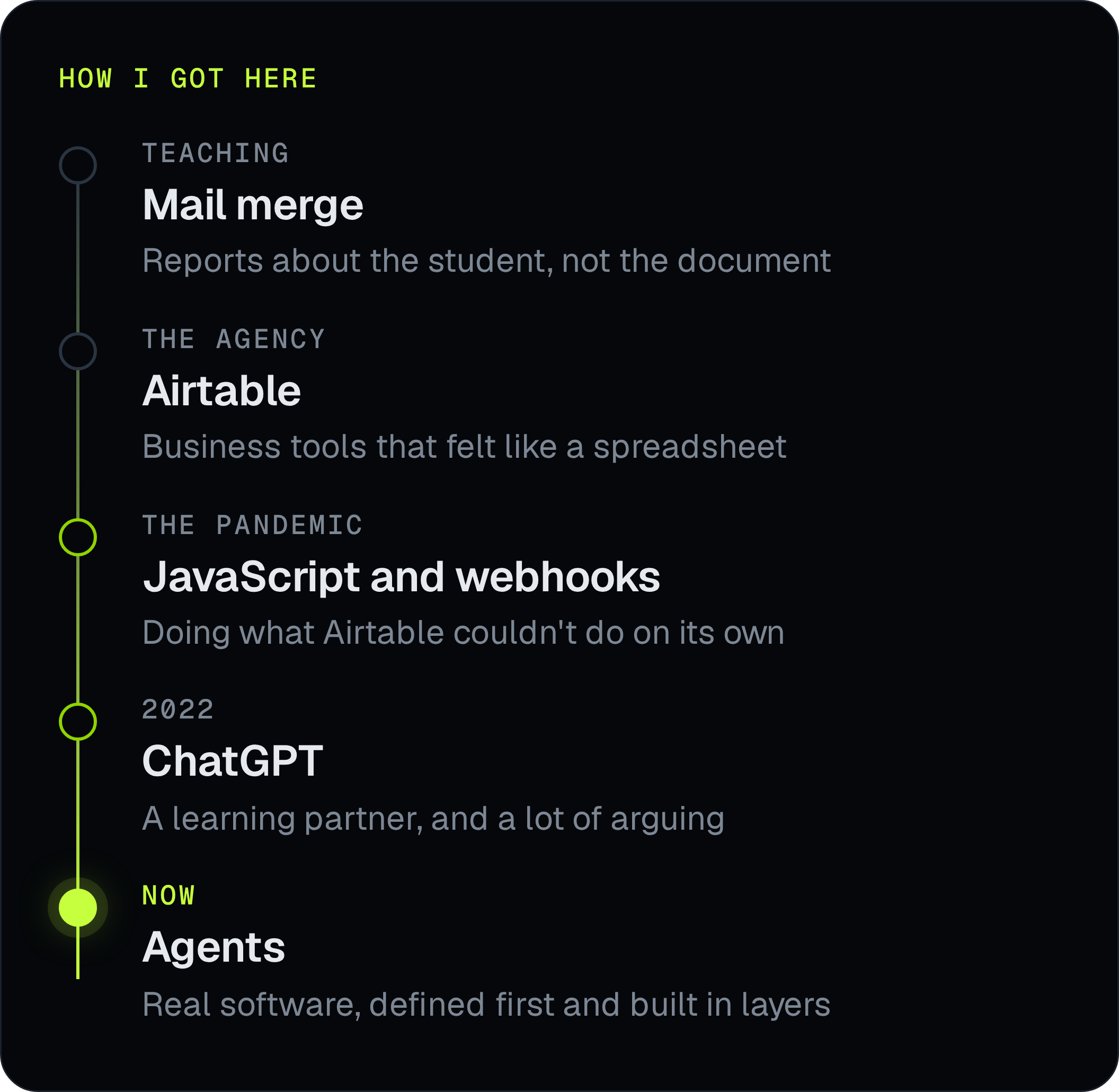
When I first started building business tools in Airtable, the tables felt familiar, like a spreadsheet. What made it more powerful than a spreadsheet was how the data could be used. As my Airtable’s needs grew, so did my knowledge. I wanted to handle data in ways Airtable didn’t do on its own, and to send emails that looked on-brand, so I got my head around JavaScript and webhooks (a way for one app to tell another that something has happened).
During the pandemic I was keen to learn to code, so I followed YouTube channels that taught JavaScript and worked through a range of Udemy courses.
Soon after ChatGPT launched, I tried getting it to write the JavaScript for Airtable’s scripting. It had the basics down, but there was so much trial and error: hours of back and forth, arguing that it didn’t understand the particular flavour of JavaScript I was using. Knowing a little meant I could push back and get the job done. AI was a useful learning tool, something to bounce ideas off and work through problems with, and that’s still how I use it today. Thankfully, the results are much better now.
There’s been a lot of chatter about “vibe coding”. The term was coined in early 2025 for building by describing what you want and accepting whatever comes back, without really looking at the code. Not long ago that was a real problem, because the tools simply weren’t good enough. They’ve caught up a lot since. For landing pages and simple websites, a single prompt can give excellent results. For larger or more complex apps, I’d recommend a more structured approach.
Today I build full-stack apps (the part people see and the database behind it) with complex logic, using my own structured method of agentic engineering. There’s so much advice out there that it can feel overwhelming, particularly where security is concerned. So here’s what I’d look out for, and in the next log, exactly how I’d start.
What to look out for
Building my own apps is one of the most rewarding things I’ve done. It isn’t without its quirks, though, and most importantly, its responsibilities. What matters depends on what you’re building, but these are the things that catch people out:
- Personal data. Names, emails, documents. In the UK and Europe, GDPR applies.
- Logins. Personal accounts, passwords, and who can see what.
- Sending data to AI. If your app uses AI, know what data you’re sending, and where it goes.
- Backups and updates. An app needs looking after once it’s live.
- Hosting. Where it runs, and what it costs as more people use it.
And when you build it yourself, you’re the one on call to fix problems at 3am on a Sunday morning!
When to get a second pair of eyes
Part of learning is understanding the what, how and why of the features you build. That matters most when people rely on your app working every time, when it holds personal data, and when money goes through it. Those are the moments to get a second pair of eyes: before real people use it, ask someone who has built the same kind of thing to look it over.
Do your own due diligence too. Always read the documentation for any service you connect. If you’re adding Stripe for payments, for example, read how the integration works. A great way to do this is to give the documentation to your AI agent and ask for a summary as a clear, simple HTML page you can come back to.
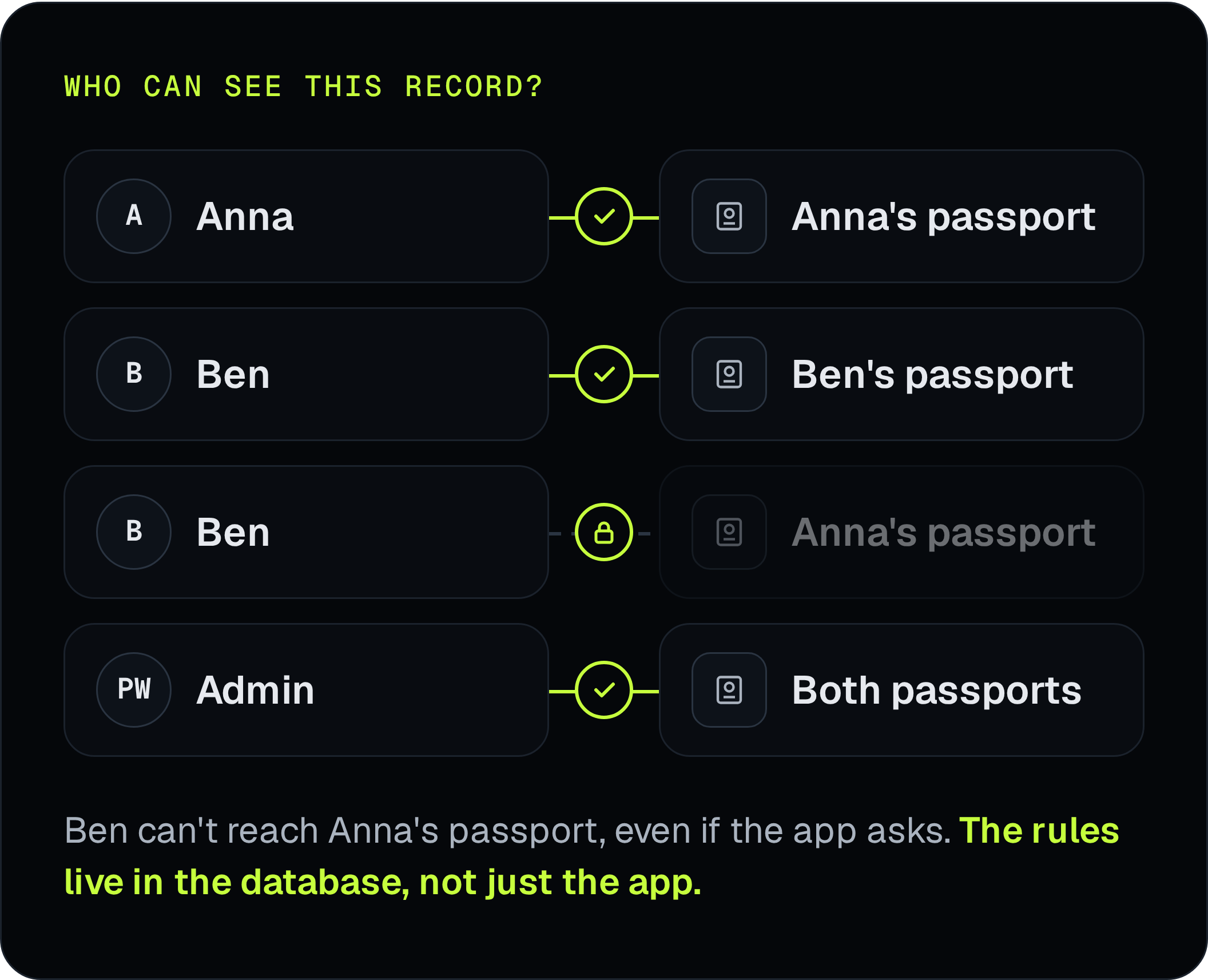
An example from my own apps: I use Supabase, and I make sure its row-level security (RLS) is battle-tested. RLS is a set of rules inside the database itself that decides who can see each record, so only the people who should reach a record can. Handling this only in the app’s code isn’t secure, and would cause real problems for GDPR compliance. That’s exactly why my workflow is considered and structured, with testing at every stage. I recommend it to anyone building apps with a database, especially ones going live with real users.
Where this leaves you
Itching to get started? Seeing a project you’ve only ever dreamt of come to life is one of the most fascinating experiences there is. It’s even better when you’re building for others and the idea solves a real problem: it takes away what’s in the way, so they (and probably you) can focus on the job in hand.
The key takeaway: there’s no right or wrong approach, and there’s no rulebook for building with agents. But when you’re building real-world apps, try to think like a senior engineer and a project manager, with a real handle on how things are done. Agents are an excellent way to get the advice you need, and so is learning from people who have been there before. A lot of my own learning came from reading documentation on the likes of Anthropic’s and OpenAI’s websites, watching others demonstrate on YouTube and, most importantly, trial and error.
In the next log I’ll show exactly how I start a build, and the tools, channels and courses I’d point you to. Follow me on X so you don’t miss it. I’m also launching the Lab soon: a place for us to connect, share best practice and go deeper.